
Uploading files in a Next.js app looks simple until a file crosses a hidden size boundary. The app works fine in local development, then breaks after deployment with no clear reason. The root cause is almost always the Next.js file upload size limit, a default cap that exists in the framework and, separately, on the hosting platform. This guide walks through where that limit comes from, why deployment changes the behaviour, and the practical fixes for each scenario.
What is the default file upload size limit in Next.js?
Next.js applies a request body limit to protect API routes and Server Actions from oversized payloads. For API routes using the built in body parser, the default cap sits around 1MB unless configured otherwise. Server Actions carry a separate default, also close to 1MB in recent versions. Anything larger than these thresholds gets rejected before the handler code even runs, which is why a working upload form can suddenly throw an error the moment a slightly bigger file is selected.
These defaults exist for good reason. Serverless functions are billed and constrained by execution time and memory, so a small default keeps costs predictable and prevents a single request from consuming excessive resources. The limit is intentional, not a bug, but it needs adjusting for most real world upload features.
Why does a Next.js file upload work locally but fail on Vercel?
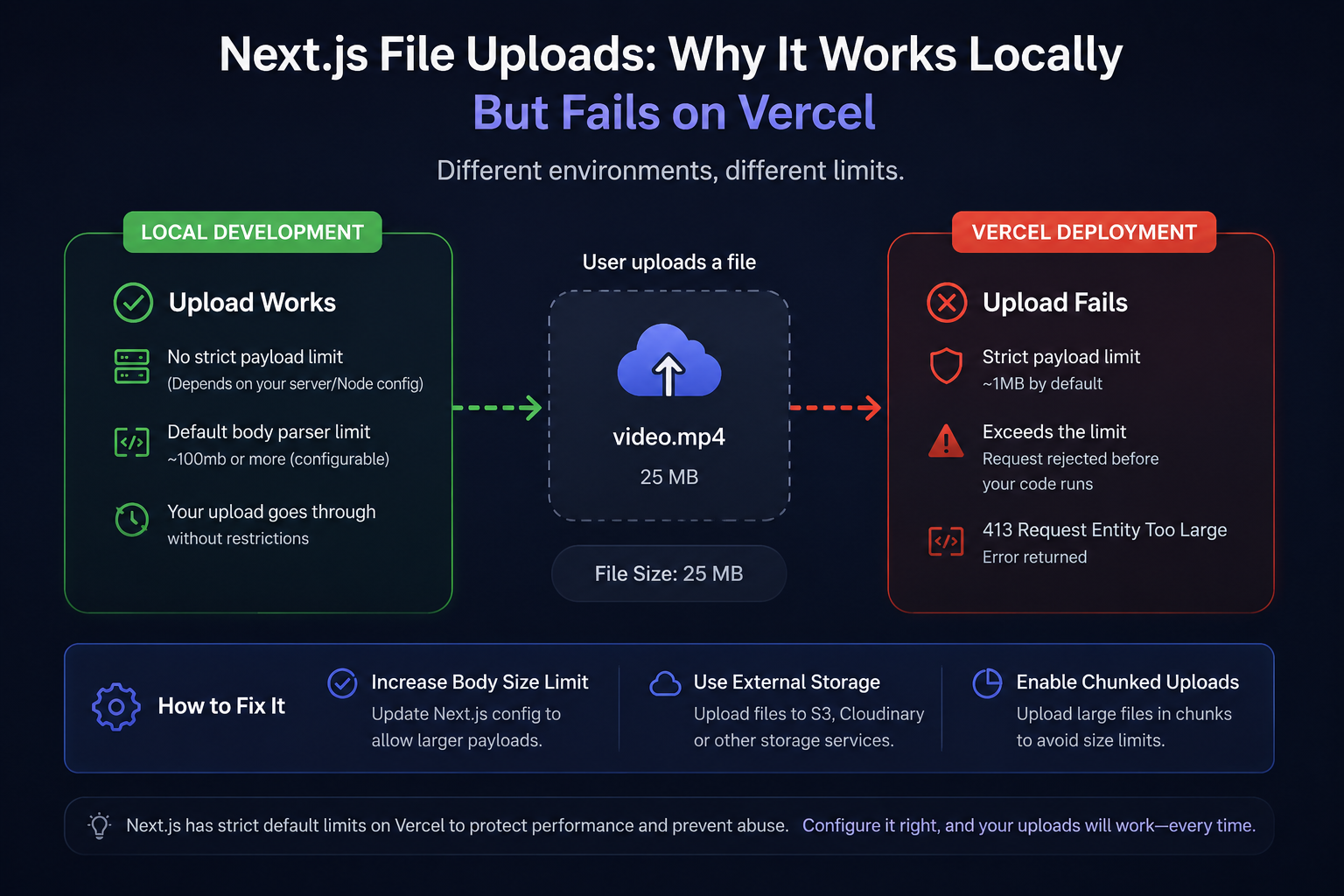
This is one of the most common points of confusion. Locally, Node runs without the strict payload ceilings that a hosting platform enforces. Once the same app deploys to Vercel, uploads that worked fine on localhost suddenly return a 413 Request Entity Too Large error.
The reason is that Vercel's Serverless Functions enforce their own payload size limit at the infrastructure level, separate from whatever is configured inside next.config.js. Even if the Next.js config allows a 10MB body, Vercel's function layer can still reject the request before it reaches the app if the payload exceeds the platform's own ceiling. This is a platform constraint, not something that can be raised through application code alone. Framework level configuration and platform level configuration are two different layers, and both need attention for large uploads to succeed in production.
How to increase the file upload size limit in Next.js?
Raising the Next.js file upload size limit for API routes happens inside next.config.js, under the api settings. The bodyParser object accepts a sizeLimit property, which can be set to a value such as 10mb instead of the default. This value gets added inside the nextConfig object that the file already exports.
Raising this number allows larger payloads through the framework's own parser. It does not, on its own, change what a hosting platform allows through at the infrastructure level, so this step should be treated as one part of the fix rather than the whole solution.
How to fix the Next.js Server Action body size limit?
Server Actions use a separate setting, since they do not go through the same API route body parser. Inside the same next.config.js file, under the experimental object, a serverActions setting accepts its own bodySizeLimit property, which can be raised to something like 5mb depending on the size of files expected.
A frequent mistake is updating only the API bodyParser value while ignoring this Server Actions setting, or the reverse. Since Next.js treats these as independent limits, both need to reflect the size of files the app expects to handle.
Why does multipart form data fail in a Next.js API route?
File uploads typically use multipart/form data, and this format interacts differently with the body parser than JSON does. A common pattern is disabling the built in body parser entirely for a route so a library such as formidable or busboy can handle the raw stream instead. This is done by exporting a config object from the route file with the api bodyParser setting turned off, which tells Next.js to step aside and let a dedicated library read the incoming stream directly.
When this step gets skipped, Next.js tries to parse multipart data as JSON, which either throws an error or silently drops the file. This is usually the root cause behind an API route that accepts text fields correctly but never receives the actual file. After disabling the parser, the multipart stream needs to be read and parsed manually with a dedicated library rather than relying on Next.js defaults.
How to upload large files in Next.js using chunking?
For files that exceed what serverless functions can reasonably accept, even after raising the configured limits, chunking is the standard workaround. The file is split into smaller pieces on the client, each chunk uploads as a separate request, and the server reassembles them once every piece arrives.
A simplified flow looks like this:
1. Split the file into fixed size chunks in the browser, often 1MB each.
2. Upload each chunk to an API route or Server Action with an index and total count attached.
3. Save each chunk to temporary storage on the server as it arrives.
4. Once the final chunk lands, merge all pieces into the complete file and clean up the temporary files.
This approach sidesteps the body size ceiling entirely, since no single request ever exceeds the configured limit. It adds complexity to both the client and server code, so it is generally reserved for apps that genuinely need to support large files such as videos or high resolution assets, rather than typical document or image uploads.
Conclusion
Most Next.js upload failures trace back to the Next.js file upload size limit in one form or another: a body size limit that has not been raised, a Server Actions limit that was missed while only the API config got updated, or a platform level ceiling on Vercel that no amount of application configuration can override. Multipart form data adds a further wrinkle, since it needs the built in parser disabled and replaced with a dedicated library. For files that stay within a reasonable size, raising the relevant config values solves the problem directly. For genuinely large files, chunked uploads remain the most reliable long term fix, since they work within platform constraints rather than against them.